

Citibank Online
Whenever you want, wherever you are
With Citibank Online you can fulfil your banking needs wherever you are in the world, however you want, available 24 hours a day 365 days a year, giving you complete control over your finances.

*Please note this screen is for illustrative purposes only.
With online card activation, you can activate your new debit or credit card and set up your ATM PIN. You will need:
- A Citibank debit or credit card number
- Your mobile phone
A One Time Password (OTP) will be sent via SMS to your registered mobile phone number which you will need to enter to complete the activation.
In addition, you can also activate your new card at Citi Mobile. Click here to learn more about Citi Mobile.
Consolidated view of your accounts
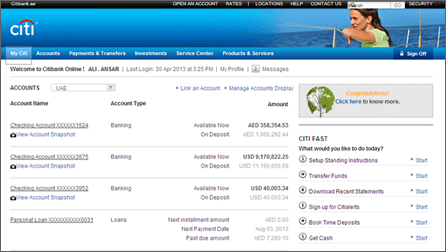
*Please note this screen is for illustrative purposes only.
With the account dashboard, you can view your accounts available and hold amounts. For your Credit Cards, you will be able to view your payment due dates and rewards points. In addition, in the Quick Links section, you will find a list of quick links to other online services.
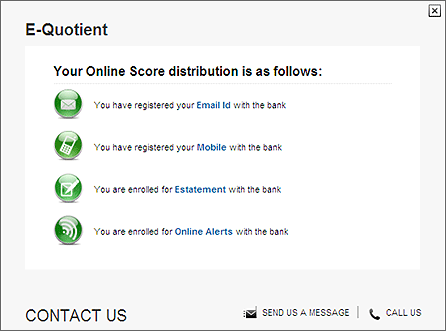
*Please note this screen is for illustrative purposes only.
On top of that, you will be able to know your online score distribution by clicking on the E-Quotient banner on top of the Quick Links section. This online score distribution tracks the list of online services that you are enrolled in.
Pay your Citi or other non-Citi credit card within a minute, transfer money globally and enjoy lower online transfer fees and FX rates, or pay your UAE utility bills with no extra cost. Your other bank credit cards and special transfers can be done through the 'Other Transfers' option.
Paying your Utility Bills has never been easier! You can pay your Utility Bills from your Citibank Credit Card or Bank Account at no extra cost
Instant payments - You can view the outstanding amount on your Bill and make payments that will reflect instantly!
Billers - Our list of Billers include Du post-paid and pre-paid, Etisalat pre-paid, Salik, DEWA and SEWA.
Add payees - Add your account numbers as payees to complete your utility bill payments.
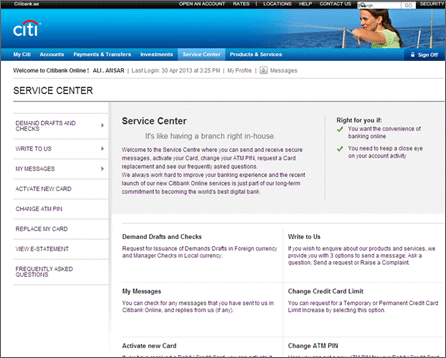
*Please note this screen is for illustrative purposes only.
The Service Center gives you even more control over how you manage your money.
With the service center, you can
- Activate your new or replaced card in 3 simple steps
- Send and receive secure messages to and from Citibank
- Change your ATM PIN
- Request for replacement card
- Request for Issuance of Demands Drafts in foreign currency and cheques in local currency
Get rid of the clutter. Check your E-Statement today. Your monthly statement is available on Citibank Online, 1-2 days after your statement date. Click here to view the short demo on where you can view your electronic statements on Citibank Online.
Access a wide range of investment options suiting your needs & meeting your financial goals
Mutual Funds
Access a select list of mutual funds offered by renowned investment managers.
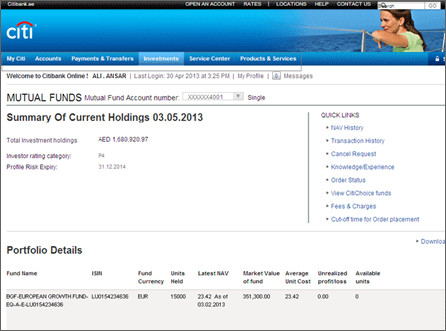
*Please note this screen is for illustrative purposes only.
Do you want to be able to act on your investment decisions, at your convenience and wherever you are in the world, without contacting your Relationship Manager, Personal Banker or CitiPhone?
With our new technology enhancements, we have made it possible to upgrade your investment portfolio with Citibank Online's new features:
E-Brokerage
Access global markets to buy / sell Equities / Bonds / Exchange traded funds
FX Buy/Sell and Order Watch
Access live rates and convert currencies or place orders conveniently
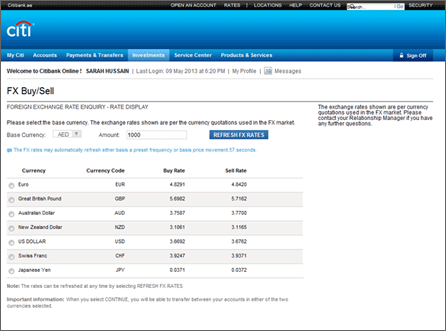
*Please note this screen is for illustrative purposes only.
Rollover transactions on a Premium Account
Convenient process to book a new contract
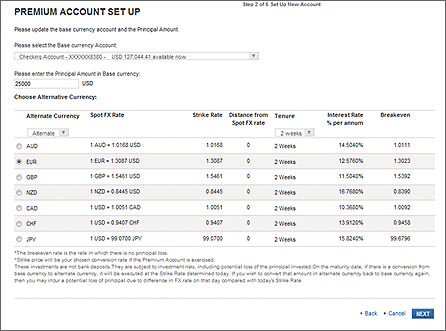
*Please note this screen is for illustrative purposes only.
Time Deposits
Park your funds in the currency of choice
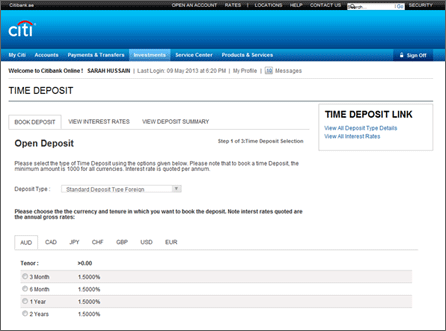
*Please note this screen is for illustrative purposes only.
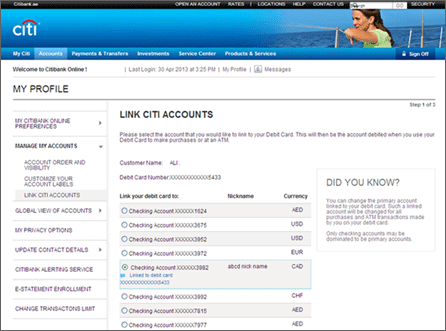
*Please note this screen is for illustrative purposes only.
With online card linkage, you can change your primary account by linking your debit card from one account to another (in any currency, provided that such currency is AED, EUR, GBP or USD) when travelling or making an online purchase to protect you from foreign exchange fluctuations. Follow the simple instructions and your card will be linked instantly to your chosen account.
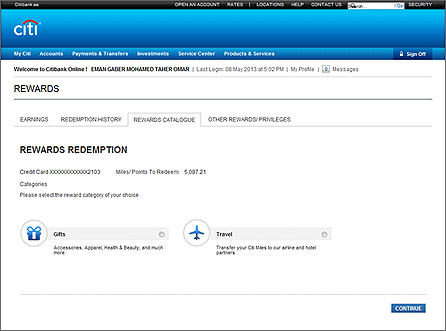
*Please note this screen is for illustrative purposes only.
In the rewards section, there are four main tabs that you may select to view - rewards earned, rewards history, rewards catalogue and other rewarding privileges. The layout is designed to allow you to redeem your rewards and select the type of rewards in a few easy and simple steps.
Enhanced Security
We consider the security of our customer’s personal data a top priority here at Citi. In light of this, our new internet banking system has enhanced security measures. Along the simplified sign on method, our innovations follow our customers’ needs and the market trends.
- Sign On - You will need to enter your registered User ID and Password using the Keyboard (No virtual/on Screen Keypad) this is part of the new system upgrade for your own convenience.
- Security Questions - You will be no longer required to answer a security question upon entering the User ID and Password when you Sign on.
- One Time Password - When you perform certain actions, such as activating your card, adding new payee, viewing your E-Statement. Citibank Online will now ask you to enter a One Time Password. This password will be sent via SMS to your primary mobile number registered on our records allowing you to complete your request.
Online Utility bill payments
Paying your Utility Bills has never been easier! Now with the New Citibank Online, you can pay your Utility Bills from your Citibank Credit Card or Bank Account at no extra cost. In addition, we’ve enhanced our system so that your payments will reflect immediately. So what are you waiting for, add all your payees and pay on the go!
- Instant payments - You can now view the outstanding amount on your Bill and make payments that will reflect instantly!
- New Billers - We have extended our list of Billers to include Du post-paid and pre-paid, Etisalat pre-paid and Salik.
- Add payees - Some of your existing payees were deleted as part of the system upgrade and you will need to add your account numbers for DEWA and Etisalat as payees to complete your utility bill payments.
For DEWA accounts, please enter the account number as the 10-digit Contract Account number mentioned on the top right side of your bill as illustrated below.

Payments towards your Etisalat post-paid accounts will now require only your 10-digit mobile number to be entered
Please refer to the below table for the payee account number format to be used for the complete list of Utility Bills available online:
| Service Types | Number Format | Examples |
|---|---|---|
| Etisalat Telephone No / Elife | 9-digit telephone number | 0432XXX31 |
| Etisalat GSM | 10-digit mobile number | 05012XXX67 |
| Etisalat Internet DIALUP, BROADBAND / Al Shamil | Account number | 440XXX456 |
| Etisalat WASEL/ WASEL renewal | 10-digit mobile number | 05012XXX67 |
| Etisalat Postpaid Mobile | 10-digit mobile number | 05012XXX67 |
| EVISION | Account number | 0432XXX31 |
| Du Prepaid Mobile | 10-digit mobile number | 05512XXX67 |
| Du Postpaid Mobile | 10-digit mobile number | 05512XXX67 |
| Du landline | 9-digit telephone number | 0432XXX31 |
| Salik | 8-digit account number with 4-digit PIN |
123XXX78 Pin: 6789 |
| DEWA | 10-digit Contract Account number | 200XXX4567 |
| SEWA | Customer number | 123XXX7890 |
Citibank Alerting Service
Get informed by SMS on your mobile phone or by email whenever a transaction takes place on your accounts, get account balance updates and receive Credit Card and Bank account debit alerts and more!
As part of the system upgrade, if you are subscribed to the alerts service you will now be subscribed to an alert package that will include a set of Banking/Credit Card alerts availed to your accounts.
- You can configure preferred delivery time and the method of notification (by email and / or SMS)
- In addition, you will receive some alerts even if you are not subscribed to any of the alerts packages to notify you about change in your contact details, ATM PIN and any failure login attempt to Citibank Online.
- Citibank Alerting Service comes in two packages, Banking Standard and Cards Standard, which you can choose from depending on your preferences and needs.
What types of alerts are available?
Banking Alerts
| Account BalanceOnce a day/week/month | You will receive an alert with your checking account balance based on the frequency you select. |
| Time Deposit Subscription | Alert will inform you about your Time Deposit placement execution. |
| Time Deposit Maturity | Alert will inform you about your Time Deposit maturity. |
| Time Deposit Renewal | Alert will inform you post the Time Deposit Renewal. |
| Time Deposit Redemption | Alert will inform you at the time of redemption of a Time Deposit credit into your specific account. |
| Account Overdrawn | You will receive an alert notifying you when your checking account is overdrawn. |
| Debit Card Transaction | You will receive an alert when you use your Debit Card for retail purchases. |
| Direct Debit Order not carried out | You will receive an alert when Direct Debit set up on your account was not successfully completed. |
| Standing Payment Order not carried out | You will receive an alert when a Standing Instruction or a recurring transfer set up on your account was not successfully completed. |
| Order Rejected eBrokerage | You will receive an alert when your eBrokerage Order is rejected. |
| Account Debit | You will receive an alert once your checking account is debited by any amount for (ATM Withdrawal, Loan or Card Payments, Scheduled Instructions etc.). |
| Credit on Account | You will receive an alert once any amount is credited to your account through (Cash Deposit, Online Transfer etc.). |
Credit Card Alerts
| Supplementary Card Balance Once a Week | You will receive an alert informing you of balances and limit available on your Supplementary Card (if any) based on the frequency you select. |
| Supplementary Card Transaction | You will receive an alert when your Supplementary Card (if any) is used for any purchases or ATM Cash withdrawal. |
| Credit Card Transaction | You will receive an alert when you use your Credit Card for any purchases or ATM Cash withdrawal. |
How to manage your alerts
Access “My Profile” and select “Citibank Alerting Service” option to setup your Citi Alerts and be in control of your finances!
- Login to Citibank Online
- Go to "My Profile" and choose "Citibank Alerting Service"
- Click on "Edit Alert Profile"
- Choose one of the alerts package and the method of notification (email and / or SMS)
We always work hard to improve your online banking experience and the new Citibank Online is just part of our long-term goal to becoming the world's best digital bank
Please select from online banking questions and topics to resolve the most commonly occurring issues in a few simple steps.
Make sure your card is activated before you register/login.
If you are receiving 'Information not recognized' error:
- At registration:
- Make sure you enter the correct Card number, DOB and card expiry date.
- Make sure you use a unique user name. The user name you chose might already be taken
- Make sure you use a good and a secure password.
- Make sure you did not enter space or special characters.
- At login (already registered):
- Either the user name or password entered is incorrect. Please use the 'Forgot user ID' or 'Forgot Password' options appear on the login screen. Make sure to use the correct guidelines for a user name and password.
- Please avoid trying to login several times if you are not sure about your login details, because the system will block your profile to prevent fraud.
You can select the User ID Reminder link on the Sign On page. Enter your active Debit/Credit Card Number, card expiry date and date of birth and the One-Time Password you will receive on your registered primary mobile number, and Citibank Online will display your registered User ID immediately. Incase Citibank Online shows that your Card is not linked to a User ID, you will need to register your Card using the Register option on the Sign On page.
You can select the Forgot your password? Link on the Sign On page, which allows you to reset your Password by entering:
- Your registered User ID
- Your active Debit/Credit Card number, card expiry date and date of birth
- The One-Time Password you will receive on your registered primary mobile number
If you have 3 failed login attempts, your online account access will be blocked. To regain access, please make sure you are using the correct user ID, and then select the Forgot your password? link. Here is what you will need to enter:
- Your registered User ID
- Your active Debit/Credit Card number, card expiry date and date of birth
- The One-Time Password you will receive on your registered primary mobile number
If you have entered the One Time Password incorrectly 3 times before you Sign On, your online account access will be blocked for 24 Hours. You will need to try again the next day.
If you have entered the One Time Password incorrectly 3 times after you Sign On, your User ID will be blocked. You can proceed with unlocking your User ID by following the Password Reset steps by clicking on the Forgot your password? link.
Here's how to change your Citibank Online Password:
- You need to login to your online account using your User ID and Password
- Upon successful login, Click on My Profile
- Choose My Citibank Online Preferences on the left navigation menu.
- Select the Change password submenu.
Make sure you did not enter space or special characters
Yes, there are guidelines you can follow when creating your password and ways to protect it after the fact.
Choose a Good Password.
These tips make it difficult for others to guess your password and help protect your account.
| Tips | Examples |
|---|---|
| Do use at least 6 characters and a combination of letters and numbers. | Good Passwords fireman28a 5occerfan1963 mar23mbbd |
| Do not use single words that can be found in any dictionary. | Bad Password kangaroo |
| Do not use your name, your spouse's name, your pet's name, birthday, favorite food, or any personal information that others can easily obtain. | Bad Passwords viperfan fido (pet's name) |
| Do not use a password that contains part of your Online User ID or emailaddress. | Bad Password jimmy (while your ID is jimmyinjersey) |
Password and Account Protection.
There are several ways to protect your password.
- Make it memorable. Pick something you'll remember. If you do need to write it down, make sure it's kept in a safe location and not available to anyone but you. Also, since this will be the password you need to access your accounts, take the time to think of a good strong one.
- Change it periodically. Make sure to change your password from time to time using the Change Password link below. If you ever suspect that someone may have your password, don't take chances and change it immediately.
- Don't share it. No one representing the Citigroup family of companies will ask for your password in any way other than through the secure Web form on our Web site. And you should never give it to anyone who asks for it via e-mail, phone or any other medium--even if they say they're from Citigroup.
- Always sign off. End your session properly by selecting "sign off" and then closing the browser window--especially if you're using a PC at an Internet cafe or other public place.
- Update your browser. If a security update becomes available, it's a good idea to install it.
- Do not enter special characters or space.
- If you are receiving “information not recognized” error message while registration.
- Make sure you enter the correct Card number, DOB and card expiry date.
- Make sure you use a unique user name. The user name you chose might already be taken
- Make sure you use a good and a secure password.
- If you have been receiving OTP before and you have not changed your mobile number recently, please call Citiphone to get the OTP instantly through our IVR system.
- If you have changed your mobile number recently or you have never received OTP before, please login to Citibank Online and update your mobile number under 'My Profile' -> ', Update contact details' and check if you are enrolled for SMS alert by selecting 'Manage alerts from Citi' in the Quick Links section on the right side of the home screen.
Here's how to change your Citibank Online User ID:
- You need to login to your online account using your User ID and Password
- Upon successful login, Click on My Profile
- Choose My Citibank Online Preferences on the left navigation menu.
- Select Change User ID
The One Time Password is a security measure we have introduced as part of the improved Citibank Online. Please read on to understand more on how it works.
When you undertake certain actions using Citibank Online, you will be asked to input a One Time Password. The screen to enter the One Time Password appears as below and you cannot proceed to the next page, or complete your action, until the correct One Time Password is entered into the box on the screen.
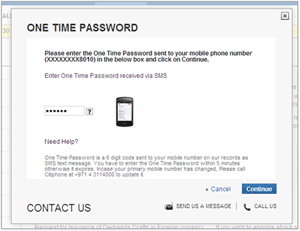
*Please note this screen is for illustrative purpose only.
You simply enter the password you have received by SMS into the box on the screen. The transaction will go through as normal and the whole process takes about one minute. Because you can only complete certain actions by entering the One Time Password, it provides extra reassurance that you are the only person who can access and use your account.
We consider the security of our customer’s personal data a top priority here at Citi. In light of this, our internet banking system has enhanced security measures. Along the simplified sign on method, our innovations follow our customers’ needs and the market trends. Therefore, giving a One Time Password is required now to add new payees, make transfers to non-registered payees, activate your cards, change your User ID, Password, Contact Details or ATM PIN. Your One Time Password is a 6-digit code that will be sent in an SMS on you mobile number available in our records.
A wide range of actions will require the One Time Password, including some of the activities mentioned below:
- Activating your Debit or Credit Card
- Replacing your Debit or Credit Card
- Registration
- Reminder service for forgotten User ID and Password
- Resetting and changing your user ID and Password
- Adding, amending or deleting payee details
- First time transfers to non-registered payees
- Changing your ATM PIN
- Change your contact details
- Viewing your E-statement
With some of the actions above you will need to enter a new One Time Password each time you use them. However, others will only request the One Time Password if you have not already provided it during that session. In all cases, it will be made clear when a One Time Password is needed.
This six-digit password should be entered as soon as you receive it. It will expire after 15 minutes, after which you will need to start again. It is important that you do not keep trying to enter a One Time Password that has expired, because online access to your account on Citibank Online will be blocked for 24 hours. Instead, if the One Time Password expires because you have waited too long, you will need to begin the action again and we will send you a fresh One Time Password.
Please sign on to Citibank Online, go to My Profile and Update Contact Details. You will be able to view your mobile number available in our records. For security reasons, only the last 4 digits of the mobile number will be displayed. If your mobile is not updated, please call CitiPhone Banking Service to update.
Always ensure that your up-to-date contact information is with us to facilitate seamless access to your accounts online. If we do not have your correct mobile number you will not be able to use many of the features of Citibank Online.
We send the six-digit password to the mobile phone number that is shown on the screen that pops up when we ask you to provide the One Time Password. It is important that you ensure we have your up-to-date mobile number for this purpose. If the number shown on the screen is incorrect, or you do not receive the One Time Password, please update your contact information in "My Profile" section of Citibank Online, or call our 24-hour CitiPhone Banking Service on +9714 3114000.
Yes, it is an important security feature designed to protect your account information. You cannot opt out of this service.
The One Time Password SMS will contain the following: Dear Customer, your One Time Password for Citibank Online is: 123456. If you did not initiate this transaction, please call +9714 3114000 now. Please note this text is for illustrative purpose only.
- Please call CitiPhone Banking Service at +9714 3114000
- Enter your Card Number and Telephone PIN
- Select option 1 for Credit Card or option 2 for Banking Account
- Select option 6 to retrieve the One Time Password for the transaction you initiated on Citibank Online
Please call us immediately on our 24-hour CitiPhone Banking Service +9714 3114000. It is very important that you contact us straight away as an unexpected message of this type could indicate your Citibank Online details may have been compromised and someone else may be attempting to access your account.
The Mobile Number update SMS will include the Mobile Number that has been changed and the alert is sent to your old and new Mobile Numbers. If you have not initiated this change request, Please call us immediately on our 24-hour CitiPhone Banking Service +9714 3114000.
To avoid any delays when banking online, we strongly recommend you call CitiPhone Banking Service and provide your new contact details two days in advance before requesting any of the following transactions online: Activating your Debit or Credit Card
- Registration
- Reminder service for forgotten User ID and Password
- Resetting and changing your user ID and Password
- Adding, amending or deleting payee details
- First time transfers to non-registered payees
- Changing your ATM PIN
- Change your contact details
If you entered an incorrect One Time Password more than three times, your access will be restricted from Citibank Online for 24 hours.
Unfortunately, we will not be able to lift the online restriction. It will stay in place to ensure your account is protected. Whilst the online restriction remains in place you will have the option to call us if you need to request transactions or account servicing.
These are the minimum and maximum amounts that you can pay online.
| Services Types | Minimum value | Maximum value |
|---|---|---|
| Etisalat Prepaid | AED 30 | AED 250 |
| Etisalat Postpaid | AED 30 | AED 10000 |
| Du Prepaid Mobile | AED 20 | AED 5000 |
| Du Postpaid Mobile | AED 20 | AED 5000 |
| Salik | AED 50 | AED 5000 |
| DEWA | AED 1 | AED 10000 |
| SEWA | AED 1 | AED 10000 |
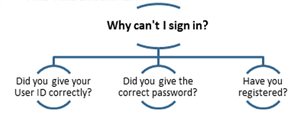
If you have answered “No” to any of the questions above, please click here to go to the sign on page and request for a User ID reminder or reset your password, or to register on Citibank Online.
- Chrome Version: 26.0.1410.64 m
Menu > Tools > Clear browsing data > Delete cookies and other site and other site and plug-in data & > You can delete cookies in the "Cookies" section. - Explorer 7
Tools > Delete Browsing history > Temporary internet files & Cookies > click on: Delete - Explorer 8
Safety > Delete Browsing history > Temporary internet files & Cookies & History & In Private Filtering Data > click on: Delete - Firefox 20.0.1.
Tools > Clear Recent History > Browsing and Download History & Cookies & Cache & Active Logins > click on: Clear Now
Please call our 24-hour CitiPhone Banking Service on +971 4 311 4000.
CitiPhone IVR
- Check your account balance
- Make an internal transfer
- Make a Credit Card payment
- Regenerate your E-Statements
- Place transfer orders*
- Place direct debit orders*
- Place permanent transfer orders to your credit card*
Alternatively, you can visit any of our branches or financial centers:
- Place transfer orders*
- Place direct debit orders*
- Place permanent transfer orders to your credit card*
Please click here to find the closest Citi branch, financial center, or ATM to you.
* Standard online fees and charges apply as per the schedule of fees and charges
This is an enhanced security measure to protect our customers’ private data. Partially hiding account numbers and card numbers in our Citibank Online area is a security measure for protecting our customers’ private data. If you wish to reveal the whole data, you can set it in the “My Profile” menu:
- Choose “Citibank Online Preferences” in the “My Profile” menu and click on the “Masking Account Information” item.
- After this you will receive a One Time Password on your mobile phone. Please enter it in the indicated field to make the modifications to information visibility on Citibank Online
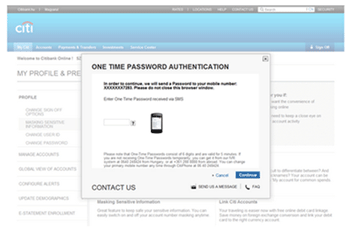
*Please note this screen is for illustrative purpose only.
Uncheck the checkbox to unmask your sensitive data and click on “done” to complete your request.
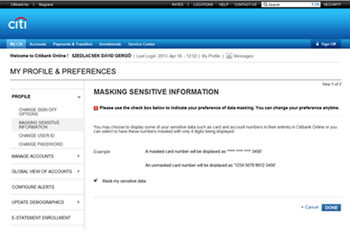
*Please note this screen is for illustrative purpose only.
Please note that masking will be reset automatically after you sign off for security reasons.
- If you do not have a current account in the desired currency, you can open one at any time by calling our 24-hour CitiPhone Banking Service on +971 4 311 4000 provided that such currency is AED, EURO, GBP or USD.
- If you already have the desired account in the appropriate currency, you can link your debit card to any of these accounts whenever you want by clicking on the Link Account link at the top of your Homepage after you Login.
In case you discover that your card is lost or it has been stolen, you must immediately:
- Call CitiPhone Banking on +971 4 311 4000 to request to block your card and reissue a new one
- In case you are near your computer, and are signed on to Citibank Online, go to the Service Center, select “Replace My Card” and follow the steps on the screen to have your card blocked and reissued
- You will also need to file a police report.
Please note that blocking your card will not prevent you from using Citibank Online, and you can continue managing your finances online, while you are waiting for your new card to arrive.
There are several ways to easily manage the overview of your accounts:
- You can set the account order and visibility on “My Citi” by clicking “My Profile” and selecting “Manage Accounts/Account Order and Visibility.” Alternatively, you can reach this menu directly from My Citi with the help of the “Manage Accounts Display” link above your account list.
- You can give nicknames to your accounts to make them more easily distinguishable. To do this, click on “My Profile” and select “Manage Accounts/Customize Account Labels.”
- If you have accounts in Citibank in a different country, you can also register to the Global View of Accounts feature, which allows you to see your accounts in one portal. To do this, click on “My Profile” and select “Global View of Accounts/Register”. After you successfully register, you can switch between countries on “My Citi” with the help of the drop down list at the top of your accounts page.
- Please note that Global View of Accounts does not allow you to do transactions from accounts abroad, you will only able to view them.